
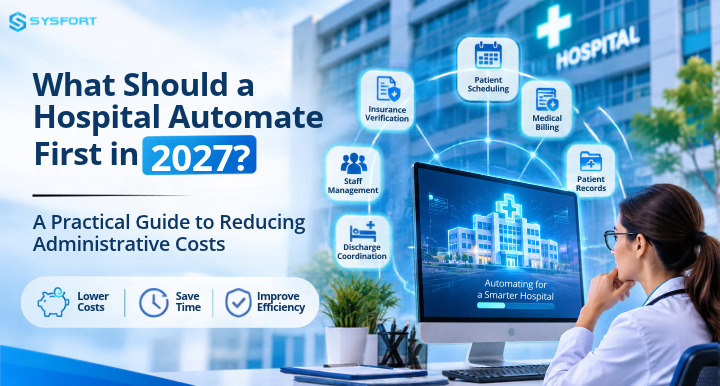
A Practical Guide to Reducing Administrative Costs
Hospitals entering 2027 face a difficult balancing act: controlling operating costs, addressing staffing shortages, improving patient experiences, and maintaining high-quality care.
One of the biggest opportunities to reduce costs is automating administrative workflows. Administrative work often involves repetitive tasks. These activities consume valuable staff time, increase operational expenses, create delays that affect both patients and healthcare professionals.
But hospitals should not automate everything at once.
The smartest approach is to prioritize processes that are:
- High-volume and repetitive.
- Expensive to manage manually.
- Prone to human error.
- Dependent on multiple departments.
- Relatively straightforward to standardize and automate.
The goal for 2027 should be simple: reduce administrative work, not replace human judgment.
The 7 Hospital Processes to Automate First
The following priorities offer a practical starting point for hospital automation.
1. Patient Scheduling and Appointment Management
Managing appointments manually can be challenging, especially for hospitals with multiple departments. Automate:
- Online appointment booking and rescheduling.
- SMS and email appointment reminders.
- Cancellation notifications.
- Patient registration and check-in.
- Follow-up appointment scheduling.
Automationreduces administrative phone calls, scheduling workloads, and avoidable missed appointments.
2. Insurance Verification and Prior Authorization
Before providing certain services, hospitals need to check insurance coverage and obtain approvals from insurance providers. Automate:
- Insurance eligibility and coverage checks.
- Prior authorization tracking.
- Approval status notifications.
- Missing document alerts.
- Patient information collection.
Automation reduces repeated data entry, helps identify delays, and makes it easier for staff to track insurance approvals.
3. Medical Billing and Claims Management
Staff often spend hours checking billing details, submitting claims, and following up on pending payments. Automate:
- Billing information validation.
- Electronic claim submission.
- Claims status tracking.
- Payment posting and reconciliation.
- Denial alerts and follow-ups.
Hospital revenue cycle automation helps faster, more accurate claims submission, reduce manual correction and improve cash flow.
4. Patient Records and Medical Documentation
Medical patient information is stored across different systems, which leads to more paperwork and duplicate data entry. Automate:
- Patient registration and data entry.
- Digital document collection.
- Medical record updates.
- Document organization and retrieval.
- Alerts for missing information.
- Integration between existing systems.
Automation reduces scanning, filing, searching and repetitive document handling.
5. Staff Scheduling and Attendance Management
Managing employee shifts, attendance, and leave requests is another time-consuming responsibility for hospital administrators. Automate:
- Employee attendance tracking.
- Shift scheduling and updates.
- Leave request management.
- Staff availability monitoring.
- Shift-change notifications.
- Department-wise staffing reports.
Automation reduces manual coordination, helps identify staffing gaps, and makes it easier to manage employee schedules.
6. Patient Discharge and Referral Coordination
Discharging a patient involves several steps. Poor coordination can create unnecessary delays. Automate:
- Discharge checklist management.
- Document preparation and approval tracking.
- Follow-up appointment reminders.
- Referral requests and tracking.
- Department notifications.
- Patient instruction delivery.
Automation keeps departments informed, reduces repeated communication, and helps make discharge and referral processes smoother.
7. Administrative Reporting and Data Management
Hospital administrators need accurate information to understand daily operations. However, collecting data from different departments and preparing reports manually takes time. Automate:
- Daily and monthly reports.
- Revenue and billing summaries.
- Pending claims reports.
- Staff attendance reports.
- Patient appointment and admission reports.
- Department-wise dashboards.
Automated reporting gives a clearer view of hospital operations to make better decisions.
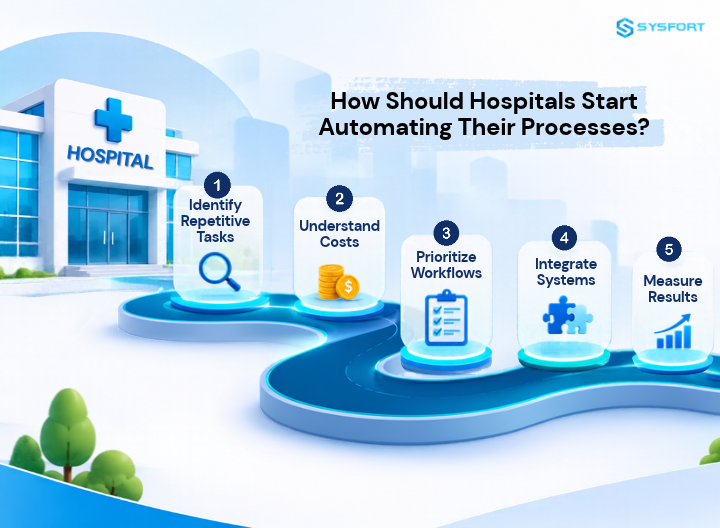
How Should Hospitals Start Automation Processes?
Automating every department at once can be expensive and difficult to manage.
A step-by-step approach is more practical.
- Identify repetitive tasks
- Understand the costs
- Start with important workflows
- Connect existing systems
- Measure the results
Hospitals should avoid launching several large automation projects simultaneously. A phased implementation reduces disruption and makes it easier to identify what is delivering savings.
First 90 days
- Days 1–30: Identify administrative bottlenecks
- Days 31–60: Implement pilot automation
- Days 61–90: Measure ROI and expansion plan
How Sysfort helps Hospital Automations?
At Sysfort, we help healthcare organizations make everyday tasks easier through
- Custom software development
- AI-powered Automation
- System Integration.
Here is how we can help:
- Simplify daily tasks
- Improve billing and insurance processes
- Connect hospital systems
- Reduce repetitive work with AI
- Make reporting easier
- Build software around hospital needs
Every hospital has different challenges, so we focus on understanding its requirements before suggesting a solution with appropriate security and compliance measures.
Sysfort solutions deliver measurable outcomes through several key performance indicators:
| KPI | What it measures |
| Cost per transaction | Administrative cost efficiency |
| Staff hours per process | Labor capacity released |
| Claim denial rate | Billing accuracy |
| Days in accounts receivable | Revenue collection speed |
| Registration error rate | Patient access accuracy |
| Prior authorization turnaround | Administrative efficiency |
| Invoice processing time | Finance productivity |
| Automation exception rate | Workflow reliability |
| Patient satisfaction | Impact on patient experience |
Our goal is simple: help hospitals save time, reduce manual work, make operations easier.
Conclusion: Start Small, Automate Smart
Hospitals should take a phased approach: identify operational bottlenecks, implement targeted automation pilots, measure financial results, and expand successful solutions across departments.
The most effective hospital automation strategy combines operational efficiency, financial accountability, and human oversight.
In 2027, hospitals should automate administrative bottlenecks first, allowing employees to spend less time managing paperwork and more time supporting patients and delivering quality care.
Start small, measure actual savings, integrate intelligently, and scale what works.
Frequently Asked Questions
1. What is hospital administrative automation?
It uses software, digital workflows, and AI to manage repetitive tasks such as scheduling, insurance verification, billing, claims processing, and reporting. It helps hospitals reduce administrative costs, minimize errors, save time, and improve operational efficiency.
2. What should hospitals automate first in 2027?
Hospitals should start with time-consuming tasks such as insurance verification, prior authorization, patient scheduling, billing, and claims management.
3. How does automation reduce hospital administrative costs?
It reduces manual data entry, paperwork, repeated follow-ups, processing delays, and administrative errors. This helps staff use their time more effectively.
4. Is AI automation suitable for small and medium-sized hospitals?
Yes. Smaller hospitals can start with specific tasks such as appointment scheduling, document management, billing, and reporting, then gradually expand as their needs grow.